Making Tax Digital Deadlines: Every Quarterly Update, Tax Return and Payment Date, 2026–27 to 2028–29
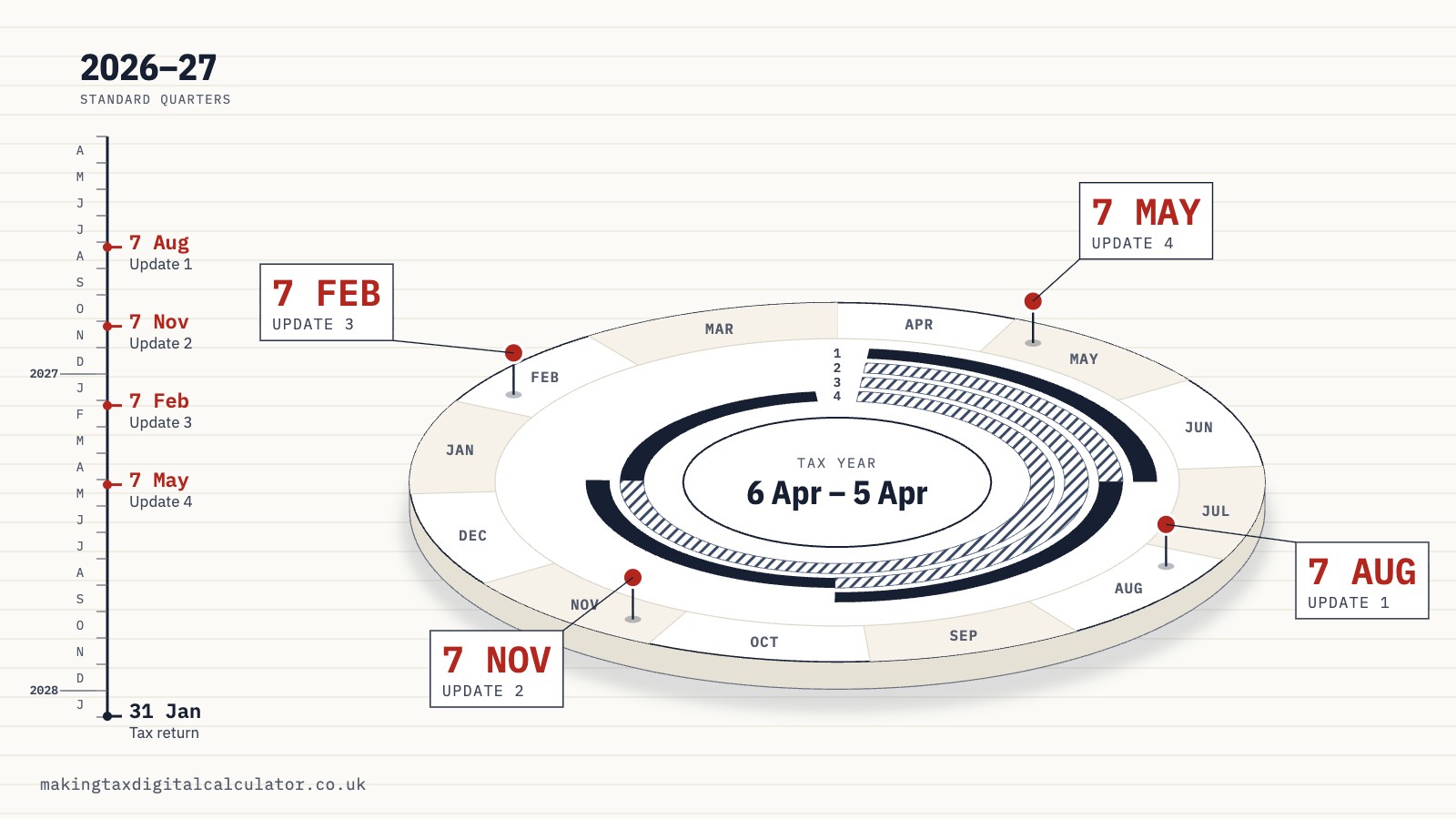
When each quarterly update, tax return and tax payment is due, for whichever April you start and with standard or calendar quarters. Turn the dial to any day to see what's due next and how long you have.
General information, not tax advice. HMRC decides what applies to you. For your own case, ask HMRC or a tax adviser.
Quarterly updates are due by 7 August, 7 November, 7 February and 7 May, every year, whichever quarters you use. The tax return for a tax year is due by 31 January after the year ends, and so is the tax you owe. The year your dates begin depends on the April you join: April 2026 if your qualifying income was over £50,000 in 2024–25, April 2027 if it was over £30,000 in 2025–26, and April 2028 if it was over £20,000 in 2026–27.
The dial below holds the lot. Pick your April and your quarters, then turn the hand to any day. It tells you what’s due next, the day of the week it lands on, how long you have, and whether a late one would earn a penalty point that year. It’s worked out in your browser from HMRC’s published rules, and nothing you choose is sent anywhere.
The tax-year dial
| You start | First update due | Late updates that year | First tax return due |
|---|---|---|---|
| April 2026 qualifying income over £50,000 in 2024–25 | 7 August 2026 Friday. Covers 6 April to 5 July 2026, or 1 April to 30 June 2026 with calendar quarters | No penalty points | 31 January 2028 Monday, for 2026 to 2027 |
| April 2027 qualifying income over £30,000 in 2025–26 | 7 August 2027 Saturday. Covers 6 April to 5 July 2027, or 1 April to 30 June 2027 with calendar quarters | A point each under the published rules. A Budget announcement of 28 October 2026 says none for people joining in April 2027. It isn’t law yet. | 31 January 2029 Wednesday, for 2027 to 2028 |
| April 2028 qualifying income over £20,000 in 2026–27 | 7 August 2028 Monday. Covers 6 April to 5 July 2028, or 1 April to 30 June 2028 with calendar quarters | A point for each late update | 31 January 2030 Thursday, for 2028 to 2029 |
The deadlines are the same with standard and calendar quarters. Only the months each update covers change.
Sources: The Income Tax (Digital Obligations) Regulations 2026 (legislation.gov.uk); Taxes Management Act 1970, section 59A (Payments on account of income tax) (legislation.gov.uk); Finance Act 2021, Schedule 24, Paragraph 5 (legislation.gov.uk); and 15 more. Checked 6 November 2026.
All 18 sources
- The Income Tax (Digital Obligations) Regulations 2026 (legislation.gov.uk), checked 6 November 2026
- Taxes Management Act 1970, section 59A (Payments on account of income tax) (legislation.gov.uk), checked 6 November 2026
- Finance Act 2021, Schedule 24, Paragraph 5 (legislation.gov.uk), checked 6 November 2026
- The Finance Act 2021 (Income Tax and Capital Gains Tax) (Penalties) (Appointed Day: Digitally Obligated Persons) Regulations 2026 (legislation.gov.uk), checked 6 November 2026
- Find out if and when you need to use Making Tax Digital for Income Tax (GOV.UK), checked 6 November 2026
- Use Making Tax Digital for Income Tax – Using Making Tax Digital for Income Tax for the first time (GOV.UK), checked 6 November 2026
- Get ready for MTD: an agent toolkit – Understanding Making Tax Digital for Income Tax (GOV.UK), checked 6 November 2026
- Penalties for Making Tax Digital for Income Tax (GOV.UK), checked 6 November 2026
- Use Making Tax Digital for Income Tax – Send quarterly updates (GOV.UK), checked 6 November 2026
- Use Making Tax Digital for Income Tax – Submit your tax return (GOV.UK), checked 6 November 2026
- Understand your Self Assessment tax bill: Payments on account (GOV.UK), checked 6 November 2026
- Use Making Tax Digital for Income Tax – Create digital records (GOV.UK), checked 6 November 2026
- Use Making Tax Digital for Income Tax – If your circumstances change (GOV.UK), checked 6 November 2026
- Penalties for Making Tax Digital for Income Tax volunteers (GOV.UK), checked 6 November 2026
- Budget 2025 — Overview of tax legislation and rates (OOTLAR) (Budget document, GOV.UK), checked 6 November 2026
- Budget 2026 — Overview of tax legislation and rates (OOTLAR) (Budget document, GOV.UK), checked 6 November 2026
- 436,000 sole traders and landlords make their tax digital (HMRC press release, GOV.UK), checked 6 November 2026
- Deadline approaches for first Making Tax Digital quarterly update (HMRC press release, GOV.UK), checked 6 November 2026
When is the first quarterly update due?
Your first quarterly update is due by 7 August in the year you start. For people who joined in April 2026 that was Friday 7 August 2026. Join in April 2027 and it’s Saturday 7 August 2027. For April 2028 it’s Monday 7 August 2028.
That first update covers your first quarter of digital records. With standard quarters the quarter runs from 6 April to 5 July. With calendar quarters it runs from 1 April to 30 June, so your records begin a few days before the tax year itself does.
Signing up late doesn’t move the start. If you sign up part-way through the year, you go back and create digital records from the beginning of the tax year, and those catch-up records go into your first update.
Sources: The Income Tax (Digital Obligations) Regulations 2026 (legislation.gov.uk); Use Making Tax Digital for Income Tax – Create digital records (GOV.UK); Use Making Tax Digital for Income Tax – Using Making Tax Digital for Income Tax for the first time (GOV.UK); and 1 more. Checked 6 November 2026.
All 4 sources
- The Income Tax (Digital Obligations) Regulations 2026 (legislation.gov.uk), checked 6 November 2026
- Use Making Tax Digital for Income Tax – Create digital records (GOV.UK), checked 6 November 2026
- Use Making Tax Digital for Income Tax – Using Making Tax Digital for Income Tax for the first time (GOV.UK), checked 6 November 2026
- Use Making Tax Digital for Income Tax – Send quarterly updates (GOV.UK), checked 6 November 2026
Making Tax Digital quarterly deadlines, year by year
The four deadlines are the same every year. Each falls a little over a month after its quarter closes, which gives you time to tidy your records and send the totals. The quarters you choose change what each update covers, never when it’s due.
The fourth update is the odd one out. Its quarter closes with the tax year, so its deadline of 7 May falls in the next tax year, when you’re already a month into new records. For a few weeks each spring you’re finishing one year and starting the next at the same time. The strip shows that overlap at true scale.
- Update 1 covers 6 April to 5 July 2026. Due by Friday 7 August 2026.
- Update 2 covers 6 April to 5 October 2026, of which 6 July to 5 October 2026 is new. Due by Saturday 7 November 2026.
- Update 3 covers 6 April 2026 to 5 January 2027, of which 6 October 2026 to 5 January 2027 is new. Due by Sunday 7 February 2027.
- Update 4 covers 6 April 2026 to 5 April 2027, of which 6 January to 5 April 2027 is new. Due by Friday 7 May 2027.
- Tax return for 2026 to 2027 and the balancing payment: due by Monday 31 January 2028. You can start it once the year ends on 5 April 2027.
- Months new in that update
- Months it repeats (each update covers the year so far)
- Time to send it
- Deadline
Payments on account for 2026 to 2027, if you make them, are due by 31 January 2027 and 31 July 2027. The strip shows the four updates and the return, so they aren’t on it.
Sources: The Income Tax (Digital Obligations) Regulations 2026 (legislation.gov.uk); Taxes Management Act 1970, section 59A (Payments on account of income tax) (legislation.gov.uk); Use Making Tax Digital for Income Tax – Submit your tax return (GOV.UK); and 5 more. Checked 6 November 2026.
All 8 sources
- The Income Tax (Digital Obligations) Regulations 2026 (legislation.gov.uk), checked 6 November 2026
- Taxes Management Act 1970, section 59A (Payments on account of income tax) (legislation.gov.uk), checked 6 November 2026
- Use Making Tax Digital for Income Tax – Submit your tax return (GOV.UK), checked 6 November 2026
- Use Making Tax Digital for Income Tax – Using Making Tax Digital for Income Tax for the first time (GOV.UK), checked 6 November 2026
- Understand your Self Assessment tax bill: Payments on account (GOV.UK), checked 6 November 2026
- Use Making Tax Digital for Income Tax – Send quarterly updates (GOV.UK), checked 6 November 2026
- Use Making Tax Digital for Income Tax – Create digital records (GOV.UK), checked 6 November 2026
- Use Making Tax Digital for Income Tax – If your circumstances change (GOV.UK), checked 6 November 2026
Follow one update’s bar and you see its whole life. The solid part is the months that are new to it. The paler part is the months it repeats from the updates before. The dotted run is the time you have to send it, and the red mark is the deadline. The tax return comes last, long after the year has closed.
If you started in April 2026
Update 1 6 April to 5 July 2026
the first quarter
No points for a late one this year
Update 2 6 July to 5 October 2026
with the year so far, from 6 April 2026
No points for a late one this year
Update 3 6 October 2026 to 5 January 2027
with the year so far, from 6 April 2026
No points for a late one this year
Update 4 6 January to 5 April 2027
with the year so far, from 6 April 2026
No points for a late one this year
Tax return for 2026 to 2027
and the tax to pay
A late return earns a point
- HMRC’s guidance states the first-year easements, and this page applies them as HMRC states them.
- 7 November 2026 is a Saturday and 7 February 2027 is a Sunday. HMRC’s own first-year timetable keeps weekend dates as deadlines, so plan to send by the date shown.
Sources: The Income Tax (Digital Obligations) Regulations 2026 (legislation.gov.uk); Taxes Management Act 1970, section 59A (Payments on account of income tax) (legislation.gov.uk); Finance Act 2021, Schedule 24, Paragraph 5 (legislation.gov.uk); and 11 more. Checked 6 November 2026.
All 14 sources
- The Income Tax (Digital Obligations) Regulations 2026 (legislation.gov.uk), checked 6 November 2026
- Taxes Management Act 1970, section 59A (Payments on account of income tax) (legislation.gov.uk), checked 6 November 2026
- Finance Act 2021, Schedule 24, Paragraph 5 (legislation.gov.uk), checked 6 November 2026
- Get ready for MTD: an agent toolkit – Understanding Making Tax Digital for Income Tax (GOV.UK), checked 6 November 2026
- Penalties for Making Tax Digital for Income Tax (GOV.UK), checked 6 November 2026
- Use Making Tax Digital for Income Tax – Send quarterly updates (GOV.UK), checked 6 November 2026
- Use Making Tax Digital for Income Tax – Submit your tax return (GOV.UK), checked 6 November 2026
- Use Making Tax Digital for Income Tax – Using Making Tax Digital for Income Tax for the first time (GOV.UK), checked 6 November 2026
- Understand your Self Assessment tax bill: Payments on account (GOV.UK), checked 6 November 2026
- Use Making Tax Digital for Income Tax – Create digital records (GOV.UK), checked 6 November 2026
- Use Making Tax Digital for Income Tax – If your circumstances change (GOV.UK), checked 6 November 2026
- Budget 2025 — Overview of tax legislation and rates (OOTLAR) (Budget document, GOV.UK), checked 6 November 2026
- 436,000 sole traders and landlords make their tax digital (HMRC press release, GOV.UK), checked 6 November 2026
- Deadline approaches for first Making Tax Digital quarterly update (HMRC press release, GOV.UK), checked 6 November 2026
If you start in April 2027
If you joined a year earlier, your second year runs to these same dates. The one difference is a Budget announcement about penalty points, which the section on points below explains.
Update 1 6 April to 5 July 2027
the first quarter
A late one earns a point under the published rules*
Update 2 6 July to 5 October 2027
with the year so far, from 6 April 2027
A late one earns a point under the published rules*
Update 3 6 October 2027 to 5 January 2028
with the year so far, from 6 April 2027
A late one earns a point under the published rules*
Update 4 6 January to 5 April 2028
with the year so far, from 6 April 2027
A late one earns a point under the published rules*
Tax return for 2027 to 2028
and the tax to pay
A late return earns a point
* Budget 2026 (28 October 2026) announced that people who must join in April 2027 will not get penalty points for late quarterly updates in the 2027 to 2028 tax year. That is not law yet, and HMRC’s penalty guidance still says late updates earn points after 2026 to 2027. We count the points under the published rules and show separately what the announcement would change.
- The regulations that switched on the new penalties (SI 2026/370) cover people who were in Making Tax Digital in the 2026 to 2027 tax year. Budget 2025 announced that the government would legislate to bring everyone else under them from 6 April 2027. No regulations doing that were on legislation.gov.uk on 6 November 2026. HMRC’s guidance already treats you as under the new penalties, and so does this page.
- 7 August 2027 is a Saturday, 7 November 2027 is a Sunday and 7 May 2028 is a Sunday. HMRC’s own first-year timetable keeps weekend dates as deadlines, so plan to send by the date shown.
Sources: The Income Tax (Digital Obligations) Regulations 2026 (legislation.gov.uk); Taxes Management Act 1970, section 59A (Payments on account of income tax) (legislation.gov.uk); Finance Act 2021, Schedule 24, Paragraph 5 (legislation.gov.uk); and 12 more. Checked 6 November 2026.
All 15 sources
- The Income Tax (Digital Obligations) Regulations 2026 (legislation.gov.uk), checked 6 November 2026
- Taxes Management Act 1970, section 59A (Payments on account of income tax) (legislation.gov.uk), checked 6 November 2026
- Finance Act 2021, Schedule 24, Paragraph 5 (legislation.gov.uk), checked 6 November 2026
- The Finance Act 2021 (Income Tax and Capital Gains Tax) (Penalties) (Appointed Day: Digitally Obligated Persons) Regulations 2026 (legislation.gov.uk), checked 6 November 2026
- Use Making Tax Digital for Income Tax – Send quarterly updates (GOV.UK), checked 6 November 2026
- Use Making Tax Digital for Income Tax – Submit your tax return (GOV.UK), checked 6 November 2026
- Use Making Tax Digital for Income Tax – Using Making Tax Digital for Income Tax for the first time (GOV.UK), checked 6 November 2026
- Understand your Self Assessment tax bill: Payments on account (GOV.UK), checked 6 November 2026
- Use Making Tax Digital for Income Tax – Create digital records (GOV.UK), checked 6 November 2026
- Use Making Tax Digital for Income Tax – If your circumstances change (GOV.UK), checked 6 November 2026
- Penalties for Making Tax Digital for Income Tax (GOV.UK), checked 6 November 2026
- Penalties for Making Tax Digital for Income Tax volunteers (GOV.UK), checked 6 November 2026
- Budget 2026 — Overview of tax legislation and rates (OOTLAR) (Budget document, GOV.UK), checked 6 November 2026
- Budget 2025 — Overview of tax legislation and rates (OOTLAR) (Budget document, GOV.UK), checked 6 November 2026
- 436,000 sole traders and landlords make their tax digital (HMRC press release, GOV.UK), checked 6 November 2026
If you start in April 2028
Update 1 6 April to 5 July 2028
the first quarter
A late one earns a point
Update 2 6 July to 5 October 2028
with the year so far, from 6 April 2028
A late one earns a point
Update 3 6 October 2028 to 5 January 2029
with the year so far, from 6 April 2028
A late one earns a point
Update 4 6 January to 5 April 2029
with the year so far, from 6 April 2028
A late one earns a point
Tax return for 2028 to 2029
and the tax to pay
A late return earns a point
- The regulations that switched on the new penalties (SI 2026/370) cover people who were in Making Tax Digital in the 2026 to 2027 tax year. Budget 2025 announced that the government would legislate to bring everyone else under them from 6 April 2027. No regulations doing that were on legislation.gov.uk on 6 November 2026. HMRC’s guidance already treats you as under the new penalties, and so does this page.
Sources: The Income Tax (Digital Obligations) Regulations 2026 (legislation.gov.uk); Taxes Management Act 1970, section 59A (Payments on account of income tax) (legislation.gov.uk); Finance Act 2021, Schedule 24, Paragraph 5 (legislation.gov.uk); and 12 more. Checked 6 November 2026.
All 15 sources
- The Income Tax (Digital Obligations) Regulations 2026 (legislation.gov.uk), checked 6 November 2026
- Taxes Management Act 1970, section 59A (Payments on account of income tax) (legislation.gov.uk), checked 6 November 2026
- Finance Act 2021, Schedule 24, Paragraph 5 (legislation.gov.uk), checked 6 November 2026
- The Finance Act 2021 (Income Tax and Capital Gains Tax) (Penalties) (Appointed Day: Digitally Obligated Persons) Regulations 2026 (legislation.gov.uk), checked 6 November 2026
- Get ready for MTD: an agent toolkit – Understanding Making Tax Digital for Income Tax (GOV.UK), checked 6 November 2026
- Penalties for Making Tax Digital for Income Tax (GOV.UK), checked 6 November 2026
- Use Making Tax Digital for Income Tax – Send quarterly updates (GOV.UK), checked 6 November 2026
- Use Making Tax Digital for Income Tax – Submit your tax return (GOV.UK), checked 6 November 2026
- Use Making Tax Digital for Income Tax – Using Making Tax Digital for Income Tax for the first time (GOV.UK), checked 6 November 2026
- Understand your Self Assessment tax bill: Payments on account (GOV.UK), checked 6 November 2026
- Use Making Tax Digital for Income Tax – Create digital records (GOV.UK), checked 6 November 2026
- Use Making Tax Digital for Income Tax – If your circumstances change (GOV.UK), checked 6 November 2026
- Budget 2025 — Overview of tax legislation and rates (OOTLAR) (Budget document, GOV.UK), checked 6 November 2026
- 436,000 sole traders and landlords make their tax digital (HMRC press release, GOV.UK), checked 6 November 2026
- Deadline approaches for first Making Tax Digital quarterly update (HMRC press release, GOV.UK), checked 6 November 2026
Standard or calendar quarters: which should you use?
Use calendar quarters if your accounts run to 31 March. HMRC says you should, and that it will make your record keeping simpler. Your quarters then end on the last day of a month, in step with your books. Everyone else uses standard quarters, which follow the tax year and are what your software starts you on.
Both sets of quarters lead to the same four deadlines. Here is the calendar version for people starting in April 2027. Compare the months each update covers with the standard leaves above.
Update 1 1 April to 30 June 2027
the first quarter
A late one earns a point under the published rules*
Update 2 1 July to 30 September 2027
with the year so far, from 1 April 2027
A late one earns a point under the published rules*
Update 3 1 October to 31 December 2027
with the year so far, from 1 April 2027
A late one earns a point under the published rules*
Update 4 1 January to 31 March 2028
with the year so far, from 1 April 2027
A late one earns a point under the published rules*
Tax return for 2027 to 2028
and the tax to pay
A late return earns a point
* Budget 2026 (28 October 2026) announced that people who must join in April 2027 will not get penalty points for late quarterly updates in the 2027 to 2028 tax year. That is not law yet, and HMRC’s penalty guidance still says late updates earn points after 2026 to 2027. We count the points under the published rules and show separately what the announcement would change.
- The regulations that switched on the new penalties (SI 2026/370) cover people who were in Making Tax Digital in the 2026 to 2027 tax year. Budget 2025 announced that the government would legislate to bring everyone else under them from 6 April 2027. No regulations doing that were on legislation.gov.uk on 6 November 2026. HMRC’s guidance already treats you as under the new penalties, and so does this page.
- 7 August 2027 is a Saturday, 7 November 2027 is a Sunday and 7 May 2028 is a Sunday. HMRC’s own first-year timetable keeps weekend dates as deadlines, so plan to send by the date shown.
- One sentence on HMRC’s quarterly updates page says the third calendar update covers ‘6 April to 31 December’. HMRC’s own table and the law start calendar updates on 1 April, and we follow them.
Sources: The Income Tax (Digital Obligations) Regulations 2026 (legislation.gov.uk); Taxes Management Act 1970, section 59A (Payments on account of income tax) (legislation.gov.uk); Finance Act 2021, Schedule 24, Paragraph 5 (legislation.gov.uk); and 12 more. Checked 6 November 2026.
All 15 sources
- The Income Tax (Digital Obligations) Regulations 2026 (legislation.gov.uk), checked 6 November 2026
- Taxes Management Act 1970, section 59A (Payments on account of income tax) (legislation.gov.uk), checked 6 November 2026
- Finance Act 2021, Schedule 24, Paragraph 5 (legislation.gov.uk), checked 6 November 2026
- The Finance Act 2021 (Income Tax and Capital Gains Tax) (Penalties) (Appointed Day: Digitally Obligated Persons) Regulations 2026 (legislation.gov.uk), checked 6 November 2026
- Use Making Tax Digital for Income Tax – Send quarterly updates (GOV.UK), checked 6 November 2026
- Use Making Tax Digital for Income Tax – Submit your tax return (GOV.UK), checked 6 November 2026
- Use Making Tax Digital for Income Tax – Using Making Tax Digital for Income Tax for the first time (GOV.UK), checked 6 November 2026
- Understand your Self Assessment tax bill: Payments on account (GOV.UK), checked 6 November 2026
- Use Making Tax Digital for Income Tax – Create digital records (GOV.UK), checked 6 November 2026
- Use Making Tax Digital for Income Tax – If your circumstances change (GOV.UK), checked 6 November 2026
- Penalties for Making Tax Digital for Income Tax (GOV.UK), checked 6 November 2026
- Penalties for Making Tax Digital for Income Tax volunteers (GOV.UK), checked 6 November 2026
- Budget 2026 — Overview of tax legislation and rates (OOTLAR) (Budget document, GOV.UK), checked 6 November 2026
- Budget 2025 — Overview of tax legislation and rates (OOTLAR) (Budget document, GOV.UK), checked 6 November 2026
- 436,000 sole traders and landlords make their tax digital (HMRC press release, GOV.UK), checked 6 November 2026
To use calendar quarters, you select them in your software before you send the first update of the tax year. Once you’ve sent one, you can’t change for the rest of that year. In law the choice is an election, and it carries on into later years until you withdraw it.
There’s one wrinkle. If you sent standard updates last year and switch to calendar quarters this year, your first calendar quarter starts on 6 April rather than 1 April. That’s the only case where it does.
If your accounts end on another date, such as the end of December, your updates still follow one of the two sets of quarters. HMRC says you’ll make extra adjustments in your software after the year ends, and it hasn’t yet published how.
Sources: The Income Tax (Digital Obligations) Regulations 2026 (legislation.gov.uk); Use Making Tax Digital for Income Tax – Create digital records (GOV.UK); Use Making Tax Digital for Income Tax – Send quarterly updates (GOV.UK); and 1 more. Checked 6 November 2026.
All 4 sources
- The Income Tax (Digital Obligations) Regulations 2026 (legislation.gov.uk), checked 6 November 2026
- Use Making Tax Digital for Income Tax – Create digital records (GOV.UK), checked 6 November 2026
- Use Making Tax Digital for Income Tax – Send quarterly updates (GOV.UK), checked 6 November 2026
- Use Making Tax Digital for Income Tax – Using Making Tax Digital for Income Tax for the first time (GOV.UK), checked 6 November 2026
Each update covers the tax year so far
Every quarterly update runs from the start of the tax year to the end of its quarter. With standard quarters, update 2 covers 6 April to 5 October, update 3 covers 6 April to 5 January, and update 4 covers the whole year. HMRC calls this cumulative.
The point of it is corrections. If you find in October that you missed an invoice from June, you add it to your records and the corrected totals go in with your next update. You don’t resend the earlier one. After the fourth update it’s different, because there’s no next one. You may need to resend the fourth update, and the law gives you until the tax return deadline to put mistakes right.
Sources: The Income Tax (Digital Obligations) Regulations 2026 (legislation.gov.uk); Use Making Tax Digital for Income Tax – Send quarterly updates (GOV.UK). Checked 6 November 2026.
What goes into a quarterly update?
A quarterly update is a set of totals for each of your businesses: income in a few categories, expenses in more, and the dates of the period they cover. HMRC sets the categories in its quarterly update direction, which has the force of law under the 2026 regulations.
One quarterly update
- One for each business. Each sole trader business and each property business you have sends its own.
- The year so far. Every total runs from the start of the tax year, not just the last three months.
- Even if nothing happened. No income or costs in the period? You still send it.
- Not before the period ends, unless it’s within 10 days of the end and you expect nothing more.
A sole trader businessself-employment
- Period start and end dates
Income totals 2
- Turnover
- Other business income
Expense totals 13
- Cost of goods bought for resale or goods used
- Construction industry — payments to subcontractors
- Wages, salaries, and other staff costs
- Car, van, and travel expenses
- Rent, rates, power, and insurance costs
- Repairs and maintenance of property and equipment
- Phone, fax, stationery, and other office costs
- Advertising
- Business entertainment costs
- Interest on bank and other loans
- Bank, credit card and other financial charges
- Accountancy, legal and other professional fees
- Other business expenses
A UK property businessrent from UK property
- Period start and end dates
Income totals 4
- Total rent
- Other income from property
- Premiums for the grant of a lease
- Reverse premiums and inducements
Expense totals 9
- Rent, rates, insurance and ground rents
- Property repairs and maintenance
- Non-residential property finance costs
- Residential property finance costs
- Residential finance costs brought forward
- Legal, management and other professional fees
- Costs of services provided, including wages
- Travel expenses
- Other allowable property expenses
Each line is a total for the year so far, which your software works out from your digital records.
Sources: The Income Tax (Digital Obligations) Regulations 2026 (legislation.gov.uk); Making Tax Digital for Income Tax: quarterly update direction (GOV.UK); and 1 more. Checked 6 November 2026.
All 3 sources
- The Income Tax (Digital Obligations) Regulations 2026 (legislation.gov.uk), checked 6 November 2026
- Making Tax Digital for Income Tax: quarterly update direction (GOV.UK), checked 6 November 2026
- Use Making Tax Digital for Income Tax – Send quarterly updates (GOV.UK), checked 6 November 2026
A sole trader’s update has 2 income totals and 13 expense totals. A UK landlord’s has 4 and 9. Foreign property has a shorter list of its own.
You don’t always need to sort every record into those categories as you go. Below the VAT threshold you can categorise your records in less detail. A sole trader then only records whether each one is income or an expense. A landlord with UK residential property also records whether each expense is a restricted finance cost. Once turnover from an income source reaches £90,000, every record for that source has to be categorised in full. HMRC says that turnover test doesn’t apply to foreign property income.
The deadlines count per business, too. Two sole trader businesses and a flat you let make three updates every quarter, all due on the same day. A quarter with nothing in it still needs its update. Send it with nothing to report and it counts as sent.
Sources: Use Making Tax Digital for Income Tax – Create digital records (GOV.UK); Making Tax Digital for Income Tax: quarterly update direction (GOV.UK). Checked 6 November 2026.
Can you send a quarterly update early?
Yes, a little. You can send an update any time after its quarter ends, up to and including the deadline day. You can also send it up to 10 days before the quarter ends, if you don’t expect to record anything more in it. For the first standard quarter of 2026 to 2027, the earliest day was 25 June 2026.
Sending early has a cost if something does turn up. The late item then goes into the next update instead, which is fine for updates 1 to 3. For the fourth, it means sending it again.
Sources: The Income Tax (Digital Obligations) Regulations 2026 (legislation.gov.uk); Use Making Tax Digital for Income Tax – Send quarterly updates (GOV.UK). Checked 6 November 2026.
What if a deadline falls on a weekend?
Plan to send it by the date shown. HMRC’s own first-year timetable lists 7 November 2026 and 7 February 2027 as they are, though the first is a Saturday and the second a Sunday.
There are several more to come. Treat each one as fixed and plan to send it before the weekend.
| Date | Day | What is due |
|---|---|---|
| 7 November 2026 | Saturday | Quarterly update 2 for 2026 to 2027 |
| 7 February 2027 | Sunday | Quarterly update 3 for 2026 to 2027 |
| 7 August 2027 | Saturday | Quarterly update 1 for 2027 to 2028 |
| 7 November 2027 | Sunday | Quarterly update 2 for 2027 to 2028 |
| 7 May 2028 | Sunday | Quarterly update 4 for 2027 to 2028 |
Source: Use Making Tax Digital for Income Tax – Using Making Tax Digital for Income Tax for the first time (GOV.UK). Checked 6 November 2026.
When is the tax return due under Making Tax Digital?
By 31 January after the tax year ends, the same as Self Assessment. You may see it called the final declaration in older guides. HMRC’s current guidance calls it your tax return, and you send it through the same compatible software as your updates.
The first returns under Making Tax Digital are for 2026 to 2027, due by 31 January 2028. If you join in April 2027, your first is due by 31 January 2029, and for April 2028 by 31 January 2030.
The return is where you finish the year. You add anything the updates don’t carry, such as other income, reliefs and allowances, and confirm the figures. All four quarterly updates have to be sent before you can send it, even in a year with no penalty points for late ones. You can change the return within 12 months of the deadline, so for 2026 to 2027 until 31 January 2029.
Sources: The Income Tax (Digital Obligations) Regulations 2026 (legislation.gov.uk); Use Making Tax Digital for Income Tax – Submit your tax return (GOV.UK); Use Making Tax Digital for Income Tax – Using Making Tax Digital for Income Tax for the first time (GOV.UK). Checked 6 November 2026.
When do you pay the tax?
On the same day as the return. The balancing payment for a tax year is due by 31 January after it ends. Making Tax Digital doesn’t change how you pay or when, and a quarterly update isn’t a payment date.
Payments on account carry on as before. If you make them, each one is half of the tax you owed last year, and they’re due by 31 January and 31 July. You don’t have to make them if last year’s bill was under £1,000, or if more than 80% of last year’s tax was paid outside Self Assessment, through your tax code for example.
The first payment on account for a tax year is due by 31 January in that tax year, and the second by the 31 July after it ends. So for 2027 to 2028 they’re due by 31 January 2028 and 31 July 2028. They aren’t on the dial or the strip, which show the four updates and the return.
Sources: Taxes Management Act 1970, section 59A (Payments on account of income tax) (legislation.gov.uk); Understand your Self Assessment tax bill: Payments on account (GOV.UK); Use Making Tax Digital for Income Tax – Using Making Tax Digital for Income Tax for the first time (GOV.UK); and 1 more. Checked 6 November 2026.
All 4 sources
- Taxes Management Act 1970, section 59A (Payments on account of income tax) (legislation.gov.uk), checked 6 November 2026
- Understand your Self Assessment tax bill: Payments on account (GOV.UK), checked 6 November 2026
- Use Making Tax Digital for Income Tax – Using Making Tax Digital for Income Tax for the first time (GOV.UK), checked 6 November 2026
- Use Making Tax Digital for Income Tax – Submit your tax return (GOV.UK), checked 6 November 2026
Do late quarterly updates get penalty points?
Not in 2026 to 2027. HMRC has said there are no penalty points for late quarterly updates in that tax year. You still have to send all four before your tax return, and a late return or a late payment is penalised as normal. HMRC’s guidance states it, and this page applies it as HMRC states it.
After that, the published rules give one point for each late update. At 4 points there’s a £200 penalty, and another £200 for each late deadline while you stay there.
If you join in April 2027, there’s an announcement to weigh. The Budget on 28 October 2026 said people who must join then won’t get points for late quarterly updates in 2027 to 2028. That isn’t law yet, and HMRC’s penalty guidance still says late updates earn points after 2026 to 2027. So the dial shows the published rule first and the announcement beside it, marked as announced.
The announcement doesn’t reach people who joined in April 2026, whose second year is 2027 to 2028. If you volunteered rather than had to join, late quarterly updates don’t earn you points while you’re volunteering. A late tax return earns a point in every year, the first included.
To see what a run of late updates or a late return would cost you, and when the points clear, try the penalties calculator. If you’re not sure which April is yours, the homepage works it out from your income.
Sources: Finance Act 2021, Schedule 24, Paragraph 5 (legislation.gov.uk); Finance Act 2021, Schedule 24 (legislation.gov.uk); Penalties for Making Tax Digital for Income Tax (GOV.UK); Use Making Tax Digital for Income Tax – Send quarterly updates (GOV.UK); and 7 more. Checked 6 November 2026.
All 11 sources
- Finance Act 2021, Schedule 24, Paragraph 5 (legislation.gov.uk), checked 6 November 2026
- Finance Act 2021, Schedule 24 (legislation.gov.uk), checked 6 November 2026
- Penalties for Making Tax Digital for Income Tax (GOV.UK), checked 6 November 2026
- Use Making Tax Digital for Income Tax – Send quarterly updates (GOV.UK), checked 6 November 2026
- Get ready for MTD: an agent toolkit – Understanding Making Tax Digital for Income Tax (GOV.UK), checked 6 November 2026
- Penalties for Making Tax Digital for Income Tax volunteers (GOV.UK), checked 6 November 2026
- SALF1630 – Self Assessment: the legal framework: Making Tax Digital: Miscellaneous: Making Tax Digital volunteers (HMRC manual), checked 6 November 2026
- Budget 2025 — Overview of tax legislation and rates (OOTLAR) (Budget document, GOV.UK), checked 6 November 2026
- Budget 2026 — Overview of tax legislation and rates (OOTLAR) (Budget document, GOV.UK), checked 6 November 2026
- 436,000 sole traders and landlords make their tax digital (HMRC press release, GOV.UK), checked 6 November 2026
- Deadline approaches for first Making Tax Digital quarterly update (HMRC press release, GOV.UK), checked 6 November 2026
How long do you keep your records?
For at least 5 years after the 31 January deadline for that year’s tax return, the same as for Self Assessment. The 2026 to 2027 return is due by 31 January 2028, so its records stay until at least 31 January 2033.
Your digital records begin on the first day of your first quarter, 6 April 2026 with standard quarters or 1 April 2026 with calendar ones for people who joined in April 2026.
Sources: The Income Tax (Digital Obligations) Regulations 2026 (legislation.gov.uk); Use Making Tax Digital for Income Tax – Create digital records (GOV.UK); Use Making Tax Digital for Income Tax – If your circumstances change (GOV.UK); and 2 more. Checked 6 November 2026.
All 5 sources
- The Income Tax (Digital Obligations) Regulations 2026 (legislation.gov.uk), checked 6 November 2026
- Use Making Tax Digital for Income Tax – Create digital records (GOV.UK), checked 6 November 2026
- Use Making Tax Digital for Income Tax – If your circumstances change (GOV.UK), checked 6 November 2026
- Use Making Tax Digital for Income Tax – Using Making Tax Digital for Income Tax for the first time (GOV.UK), checked 6 November 2026
- Use Making Tax Digital for Income Tax – Send quarterly updates (GOV.UK), checked 6 November 2026
An example: Imogen’s first year
Imogen is a self-employed decorator. Her turnover for 2025 to 2026 was £38,400, more than £30,000, so she must join in April 2027. Her accounts run to 31 March, so she selects calendar quarters in her software before her first update. Her digital records start on 1 April 2027.
Her first update covers 1 April to 30 June 2027 and is due by Saturday 7 August 2027. Three of her four deadlines that year land at a weekend: 7 Aug 2027, 7 Nov 2027 and 7 May 2028. She puts them in her calendar from the dial and sends each one on the Friday before.
In October she finds an invoice for £260 from June that she never recorded. She adds it to her records, and her second update, covering 1 April to 30 September 2027, carries the corrected totals. She doesn’t resend the first. Had she sent the second late, on 10 November 2027, the published rules would give her a penalty point. The Budget announcement says she wouldn’t get one, but that isn’t law yet.
Her tax return for 2027 to 2028, and any tax she owes for it, are due by Wednesday 31 January 2029.
Sources: The Income Tax (Digital Obligations) Regulations 2026 (legislation.gov.uk); Find out if and when you need to use Making Tax Digital for Income Tax (GOV.UK); Use Making Tax Digital for Income Tax – Using Making Tax Digital for Income Tax for the first time (GOV.UK); Use Making Tax Digital for Income Tax – Send quarterly updates (GOV.UK); and 3 more. Checked 6 November 2026.
All 7 sources
- The Income Tax (Digital Obligations) Regulations 2026 (legislation.gov.uk), checked 6 November 2026
- Find out if and when you need to use Making Tax Digital for Income Tax (GOV.UK), checked 6 November 2026
- Use Making Tax Digital for Income Tax – Using Making Tax Digital for Income Tax for the first time (GOV.UK), checked 6 November 2026
- Use Making Tax Digital for Income Tax – Send quarterly updates (GOV.UK), checked 6 November 2026
- Use Making Tax Digital for Income Tax – Create digital records (GOV.UK), checked 6 November 2026
- Penalties for Making Tax Digital for Income Tax (GOV.UK), checked 6 November 2026
- Budget 2026 — Overview of tax legislation and rates (OOTLAR) (Budget document, GOV.UK), checked 6 November 2026
Put the dates in your calendar
The dial can make a calendar file of every deadline from today onwards, for your April and your quarters. Press “Put these dates in my calendar” under the dial. Most calendar apps, including Google Calendar, Apple Calendar and Outlook, can open the file. Each deadline goes in as an all-day event with a reminder a week before.
The file is made in your browser. Nothing is sent to us or to anyone else, and we don’t know you’ve made one. The dates are our reading of HMRC’s published rules on the day we checked them. If a rule changes, the file won’t change with it, so come back and make a new one.